While He Was Napping

momma gets stuff done

  • Home
  • About
  • Archive
  • Do It Yourself
    • Crafts
      • No Sew
      • Painting
      • Paper Crafts
      • Repurpose Projects
      • Vinyl
      • Washi Tape
      • Kid’s Crafts
      • Fonts
    • Sewing
    • Decorate
      • Home Decor
      • Holiday Decor
    • Celebrate
      • DIY Gifts
      • DIY Your Party
  • Recipes
    • Beverages
    • Appetizer
      • Bread
      • Other Appetizers
    • Snacks
    • Main Dish
      • Meat
        • Chicken
        • Beef
        • Pork
        • Seafood
      • Vegetarian
      • Slow Cooker
      • 30 Minute Meals
    • Dips & Sauces
    • Salads
    • Pasta
    • Soup
    • Dessert
      • Cookies
      • Brownies
      • Cupcakes and Cake
      • Box Mix Recipes
      • Other Sweet Treats
    • Breakfast Food
      • Pancakes
      • Waffles
      • Muffins
      • Other Breakfast Food
  • Family
    • Babies
      • Pregnancy
      • Newborns
      • The 1st Year
    • Toddlers
    • Preschoolers
    • Kindergartners
    • 6-8 Year Olds
    • The Grown Ups
      • Date Night
      • Romantic Gifts
    • Self Care
  • For the Home
    • Cleaning
    • Organizing
    • Emergency Preparedness
  • Travel
    • Travel Tricks & Tips
    • Traveling with Kids
  • Tech & Gadgets
    • Must-Have Apps
    • Techy Home Appliances
    • Gadgets & Electronics
    • Blogging Tips
  • Printables
    • Posters
      • Quote Printables
      • Subway Art Printables
    • Printable Organizers
    • Printable Journals
    • Learning Printables & Worksheets
    • LDS Printables
  • Holidays
    • New Year’s
    • Valentine’s Day
    • St. Patrick’s Day
    • Easter
    • Cinco de Mayo
    • Mother’s Day
    • Father’s Day
    • 4th of July
    • Back to School
    • Halloween
    • Thanksgiving
    • Christmas
    • Holiday & Seasonal Printables

September 30, 2011 by Krista

Halloween Link Party

Come link up any and everything HALLOWEEN!  This link party will be open ALL month so come back and link up more stuff as you get it posted.  Make sure you come check out the cool stuff everyone else is linking up too!  I will try to do a weekly feature post from this party, but that will partly depend on how crazy life gets around here.  I will be sharing some of these links on Facebook as well.  I can’t wait to see your fantastic ideas!  Welcome to October Spooktacular and HAPPY HAUNTING!
Photobucket

<a href=”http://whilehewasnapping.blogspot.com/search/label/October%20Spooktacular”> <img src=”http://i1179.photobucket.com/albums/x381/Krista_Wolff/OSButton.jpg”>

If you have other projects to share please join the most recent Weekend Wander.  All non-Halloween projected linked here will be deleted.

September 30, 2011 by Krista

Weekend Wander #49

Hey everyone!  So, My Mr Right and I are running away for the weekend for a much needed lover’s getaway, so I’m gonna post this a little early.  Also, tonight will kick off October Spooktacular with a Halloween link party.  That will all open up around 9PM PDT tonight.  So, link all your Halloween awesomeness up to that party.

Here’s a few features from last week’s party:.

Amy at One Artsy Mama has quite the round-up of fun Fall snacks.  Go tempt your sweet tooth …
I love Kyla’s Fall bucket list!  We need to make one of these for our family.  Check it out at Funky Polka Dot Giraffe.  She’s even made one for you…
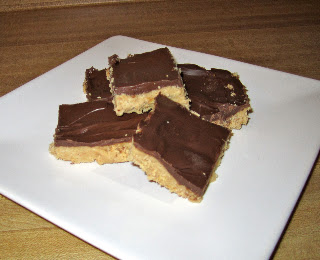
YUM!  Look at these No-Bake Peanut Butter Bars over at Crumbs and Chaos.  Definitely on my “try this” list.
Ok, the laundry is calling, so that’s it for now.  Thank you to everyone who linked up last week.  It was a great party!  There were some fantastic Halloween ideas, but I’ve been holding off sharing those until October Spooktacular… I’d definitely recommend checking out last week’s party if you missed it.  PS – any Halloween links you may have previously linked up, feel free to link them up again at the Halloween party.
And, let’s get to this.  You know what to do:
–  Family Friendly Links Only
–  No Commercial Sites
–  Visit each other!  It’s a PARTY!  
Don’t stand against the wall all night!
Have a lovely weekend!

September 29, 2011 by Krista

Blogging: Stand Alone GFC Button

I don’t know about anyone else, but I have had problems with my GFC followers widget showing up for several months now.  I have been so frustrated with it, because I know there are blogs I’ve tried to follow and can’t find their buttons, so I just leave.  I don’t have all day to reload the page until the widget decides to show up.  I wanted some way to put my own button on my blog without it being attached to Blogger’s widget.


The other day I saw a stand alone button and thought “That is SUCH a good idea!  I want one of those!”  And then I closed the window and did something mommy related, I’m sure, completely forgetting where I had seen that.  And then my Followers widget seemed to take a drastic dive in its already less-than-stellar performance.  Anytime I checked my site (as I was doing some maintenance and upkeep, it was fairly often) the GFC widget NEVER loaded.  EVER.  Ok, like twice maybe.  So, began my Google searching.  I couldn’t find a tutorial on it anywhere.  I’d pretty much given up.  I was blog surfing the other day and found a comment with the link that saved my life.  Ok, a little dramatic, yes.  But, I’ve spent FOREVER months trying to figure this out.  You can check out the original tutorial on loveyoualwaysgiveaways.com.


Here’s the How on adding a stand alone GFC Button to your site:

1.  You will need this code:


<a href="http://www.blogger.com/follow-blog.g?blogID=BLOG-ID-HERE" target="_blank" title="Follow With Google Friend Connect"><img border="0" src="http://4.bp.blogspot.com/-h3YRBHYfF5g/TeYuZ6lly6I/AAAAAAAAEOQ/e4YcH4LGnjw/s1600/follow-with-google-friend-connect-button.jpg" /></a>

Copy and paste that exactly as it is.


2.  Go to your Design tab and select Add a Gadget.  P.S.  Click on the images to make them larger.

design tab

3.  Find the HTML/JavaScript Gadget and select it.  A new window will open.

add a gadget

4.  Paste the code above into the new window.

paste code

5.  Back in your browser, on your design tab page, look up to the address bar.  It should look something like this.  Copy the number on the end and replace the red BLOG-ID-HERE text with the number.  Just the number, not the whole address.

edit the code

6.  Save the gadget.  You can then drag and drop it like any other gadget anywhere you want on your blog template.  Save the changes and view your blog to make sure it all worked.

Follow Button 


Krista


Pin It

September 28, 2011 by Krista

Framed Fall Wreath

A couple years ago I made a wreath with a Fall theme to it.  I loved it.  But, when we moved it got broken.  I still have the pieces awaiting repair in storage.  Since we only had a year in this house before we move again, I haven’t done a whole lot of decorating, especially seasonal decorating.  It just seems like a lot of work for something that won’t last long.  But, I always get the itch to bring some of the holidays into our home.  And I’m trying to de-stash some of my craft stuff…

I had other project that turned out in what can only be described as a hot mess.  The half-finished disaster sat around my mom’s house, and then our house, for months.  Yes, months.  I took some of those supplies and “un-messed” them into this little beauty:
2011-09-19_17-11-11_830

L.O.V.E.
Here’s the How:
Supplies:
– One large frame (mine’s an 11×14” frame)
– Silk leaves in Fall colors (mine are from Dollar Tree)
– Silk flowers (also from Dollar Tree and intended for a different project)
– 11”x14” of burlap (I had this on-hand from a free Swagbucks purchase on Amazon)
– Wire cutters
– Hot glue gun and glue sticks
1)  Disassemble your frame and remove the glass.  You won’t need the glass for this project.  Cover the inserts from the frame in burlap and use a little hot glue to secure it.  Reassemble the frame without the glass and with your inserts facing burlap side out.
2)  Use the wire cutters and snip as close as you can to your flower heads.  Set aside.  For the leaves, I pulled the little toppers off each branch and pulled the leaves off.  Then, I used scissors and snipped the little circular part that attached the two leaves. 
2011-09-19_15-30-05_601
3)  Do a rough layout of your flowers and leaves to get an idea of where you want to glue everything.  Once you kind of know what you think you want (hehehe), start gluing everything down.  Make adjustments as needed.
2011-09-19_17-12-02_800 
That’s it.  Hang it up and enjoy the subtle hit of Autumn, despite the 92 degree temperature outside.  At least, that’s what’s outside my door… here’s hoping for cooler days soon…
Krista

Pin It

September 27, 2011 by Krista

Felt Fall Table Runner

It’s still a million degrees here and I don’t expect cooler temperatures to be the norm for another few weeks.  We’ve had a few days of some cloudy, cooler weather and I can’t wait until we don’t have to run the A/C all the time.  But, in the meantime, I’m bringing Fall in where I can.  Here’s an easy (although slightly time-intensive) idea.

DSC_3572

Here’s the How:

1)  Supplies:

– Felt in Autumnal colors (gold, brown, yellow, orange and red are a few ideas)

– Straight Pins

– Scissors

– Hot Glue Gun

– Leaf Template (I used THIS set from enchantedlearning.com)


2)  Print out the templates and cut them out.  Pin the templates to your felt and cut them out.  Repeat in each color for however many leaves you want.  I only did one of each design in each color.  I also did some smaller ones too.  Leaves are all different sizes, after all.  Our table is relatively small (only about 4ft long) so the 15 large leaves and half a dozen small ones were enough.  This is the time-intensive part.  Park it on the sofa with a good chick flick during nap time and go to town.  That’s what I did.

2011-09-13_15-53-56_374

3)  Plug in your glue gun.  Lay out the leaves on your table.  Arrange them until you have a layout you like.  Glue the edges of the leaves together with a little dab of hot glue.


4)  You could also make this into a garland.  If you decide on that route, you’ll need two things.  1. More leaves (unless 4 ft is long enough) and 2. you’ll need to secure your leaves better than you would have to for a table runner.  You can see on the left side of the photo that a brown leaf fell down behind a gold one.  I would glue it to the orange one on the very left edge if I were to use this as a garland.  And just so you know what a garland would look like:

DSC_3600

Easy, cute and simple to store (and repair, if needs be).  Happy Fall!


Krista


Pin It

  • « Previous Page
  • 1
  • …
  • 154
  • 155
  • 156
  • 157
  • 158
  • …
  • 231
  • Next Page »

I'm Krista. Ringleader here on While He Was Napping, wife to my handsome Mr. Right & momma to my THREE energetic boys, Big J (9), Little J (6) & Little N (4). We FINALLY added a beautiful little girl to our family last December.

I’m knee-deep in Tonka trucks & Thomas trains. I survive our crazy days with Vanilla Coke, Sonic slushies, sweet snuggles and little giggles. When I tuck them in tight & kiss them good night, I get a little time to create & just be me.


It all happened
while (s)he was napping
Want More of My Story?

Privacy Policy

While He Was Napping respects your privacy and is committed to keeping any personal information collected on this website confidential. To find out what information we collect and how it is used or what options you have regarding your information, see our full privacy policy here. Creative Commons License The website found at whilehewasnapping.com and all subdomainsauthored and published by Krista is licensed under a Creative Commons Attribution-NonCommercial-NoDerivs 3.0 Unported License.

Pretty Chic Theme By: Pretty Darn Cute Design